

We all hate math, don’t we? Secretly it’s the only subject I was good at sort of, I didn’t hate it because I didn’t have to study. It’s not that I actually liked doing it… come to think of it I didn’t like doing anything on any school program ever. On with the subject at hand… aspect ratios. Hmmm, a math word, ratio. That implies fractions oh no, not those buggers. All photographers know that word, aspect ratio, right? It’s just the length of one side of the frame divided by the other. That’s it.
Well, almost… which side do I divide by the other? Should one divide the short side by the long side or the other way around? Short answer is it doesn’t matter… You just have to either multiply or divide any number you like by the aspect ratio to get the other side. Let’s take an example using the ubiquitous “full-frame” camera that happen to shoot 3:2 aspect ratio? If one takes the long side and divides by the short side it comes out to 1.5. The other way around that would be 0.6666666 repeating, don’t worry 2 or 3 digits are enough. So say you wanted to know how big a picture you’d get if you made the short side 10inches. You’d just multiply 10 x 1.5 and get 15in. Other way around if you started with the long side at 15 you’d divide by 1.5 and get 10. Easy right? You’d get the same results if you started with the long side and multiplied it by 0.666, well you’d get 9.9999999 because of precision things using decimal representation but if you took the long side multiplied by 2 and then divided by 3 you’d get the same result. See, doesn’t matter.
Why does this matter?
Why does this matter and why does anyone care? At a very basic level it’s why you cannot print a 3:2 image on an 8 x 10 piece of paper full-bleed without cropping it… or a 4:3 image on a 4 x 6 paper without cropping it. Yes, I have been asked that question by a million people when indicating; “If you don’t want borders I’ll need to crop the picture”. The same is true even with borders of equal sizes as well as we’ll see in a minute. The truth is it gets a bit more complicated as you add equal sized borders to any given piece of paper you might want to print on.
Let’s give relative names to these aspect ratios just for discussion purposes. Let’s call more extreme aspect ratios “skinnier”, extreme meaning the farther the aspect ratio is from square or farther apart one side is from the other. So that would mean a 3:2 is skinnier than a 4:3, a 16:9 is skinnier than 3:2, a 2:1 is skinnier than 16:9. It’s kind of typical to use integer numbers that are the lowest common denominator to describe aspect ratios rather than the pre-dived numbers… I’ve used common numbers most people have seen before.
Taking a break from all the elementary school math terminology for a moment let’s walk through something you can see with common sense and easily envision (I hope). Take any piece of paper, let’s see what happens to it when you start adding borders of equal amounts… the aspect ratio of the image inside those borders will always always always always get skinnier the larger the borders get. The exception is square paper… which you can probably see will stay exactly the same 1 to 1. If you can’t see that in your head just do a couple of iterations on 8x10 inch paper… let’s start with a 1 inch border… now we have 6x8 which is a skinnier ratio… let’s take 2in now we have 4x6 which is 3x2 hence 3:2… See, always get’s skinnier…
Who cares and brass tacks
If you build your own frames, cut your own mats, and everything else you can start at the beginning and just add numbers to what you started with to get your final numbers. Who cares what the final aspect ratio of the finished piece is. You can just print anything on any sized paper you want and cut the edges off to make the borders even (or offset) to anything that suits your desire. That’s absolutely reasonable but… in many cases it’s either necessary or far more efficient to work backwards to some degree.
Trying to fit an existing or pre-made frame like those typically available sizes
Using “poor-man’s” mats aka. white space on the print instead of actually making mats when framing or mounting a print on museum board.
Buying paper.
Specifying custom paper types when printing on roll paper
A thousand other reasons.
Using a bit of elementary school (reaching way back) basic laws of math like the the distributive law, the communicative law, etc and introducing a minor dash of 6th grade algebra we can automate this think a bit… steady yourself there’s an equation coming up but be calm, I swear it will be okay, you’ll get through this….
( a - 2x ) / ( b - 2x) = A
Write this down, no kidding, I swear you can use this on the fly as long as you’ve got the magic decoder ring knowing that a is the long side of the image b is the short side of the image x is the border size and A is the aspect ratio expressed as short divided by long (remember doesn’t matter but you have to keep track of which way you are going to get the dimension you want). You can use this to magically figure out anything you want… or at least what cannot be made to work. Let’s say you are super picky about no-crop, absolutely zero and you have a 3:2 image you want to put in an 11x14 (interior size/print size) frame and want absolutely even borders because you are nuts like I am… how big would those borders be? Well, let’s jigger this equation a bit using said 6th grade algebra and we would get…
x = ( b / A) - a
We know the rest of the numbers right? So let’s plug those numbers in our handy calculator and we now know the borders to use in whatever our printing software is for an 11x14 piece of paper that fits in our 11x14 frame.
x = ( 11 / 0.666 ) - 14
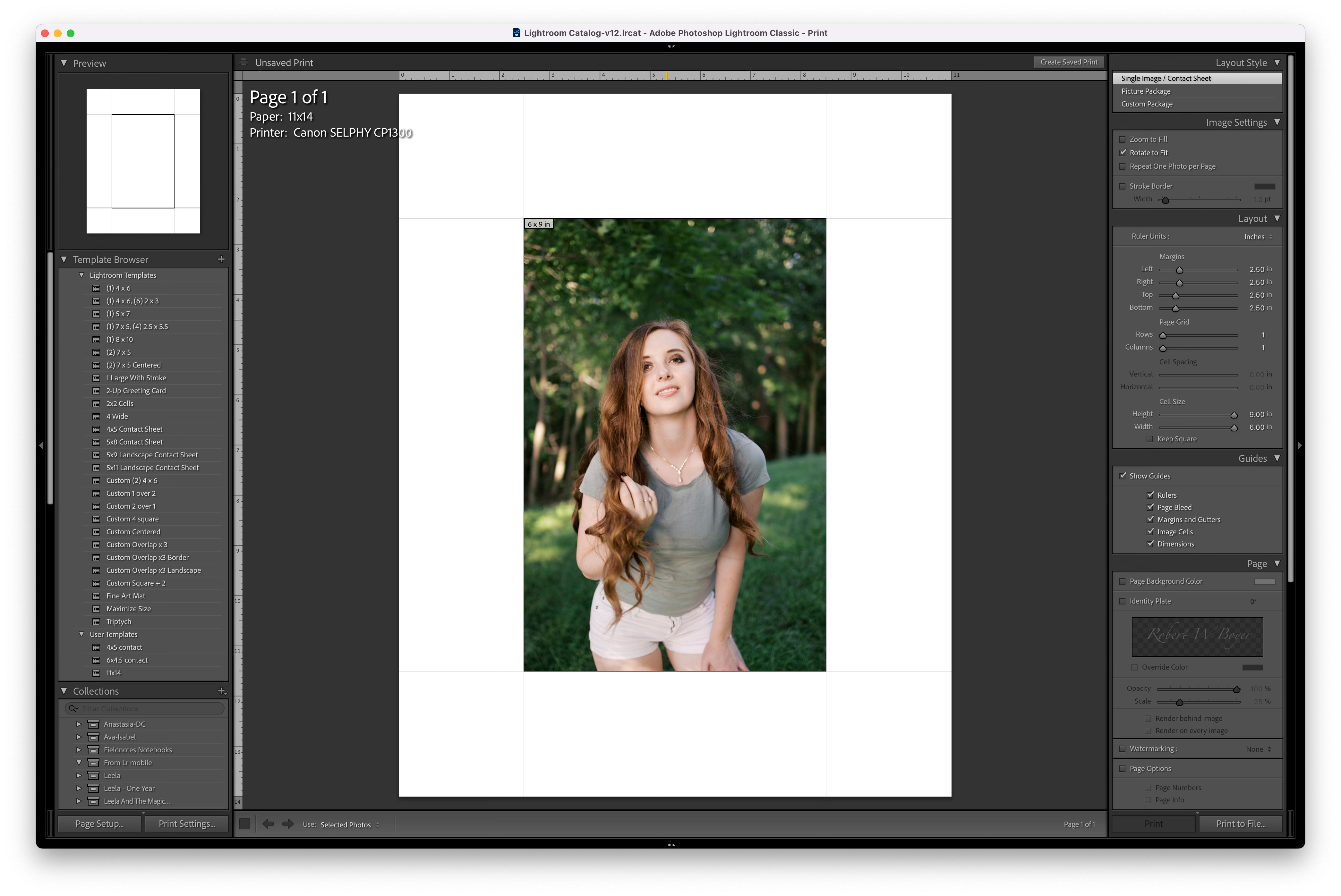
And the survey says… 2.5 in there we are. And yes I know they don’t sell 11 x 14 fine art printing papers much if at all but there are a bunch of 11 x 17 papers… you’ll have to get creative but that’s merely addition or subtraction of a constant number. Trust me you’ll only have to make one cut to make things work which is always better than two or more. Look ma… I get an image exactly 6 x 9 in the middle of the paper which I would imagine everyone can see is exactly 3:2. Yep, rigged demo given I figured this out when I loved using 11x14 paper and was printing 35mm negatives on that paper size in my parents basement. I love 6 x 9 inch 36mm prints on just about any 8x10 and 11x14 papers. But you say hey, I just used your math and there is no such animal on 8x10 paper… you’re right but there are offsets you can build in on one edge that look great when all the other boarders are even. Easy to figure out now that you’ve got a recipe and some grade school math on your side. Oh, yes… in a lot of cases a tiny bit of aspect ratio difference doesn’t tend to matter that much as with the case of the 8x10 example above where we walked through adding even borders to 8x10 paper.
Practical things and some advice
There are some take-aways that don’t take a bunch of math but understanding what’s going can help a lot. Think of the paper as a space that you can print anywhere you want. Generally you do not need exactly even borders on every side but are really nice if they are even on three sides. That last side is an offset that typically looks good on the bottom up to or even cut off to make things even all the way around. Now you can with a little fiddling around get “even borders” on three sides and just add the extra to the extra space bottom margin in the print module of whatever software you use. The giant take-away is to think things through on paper selection, re-purposing old frames, paper sizes you choose, heck you can even make a horizontal window in a portrait oriented frame (which I would do) if it’s the odd-man-out in an all vertical exhibition…. that is unless I decided it was to be printed much, much larger than everything else… be thoughtful and creative in your layouts and use of materials.
For any rectangle that is not square as you add even borders the interior aspect ratio becomes skinnier, the larger the borders the skinnier it gets.
Conversely as you add even borders to a given aspect ratio picture that is not square the fatter and fatter the aspect ratio gets.
Minor aspect ratio differences don’t matter much, don’t sweat it. Use the zoom to fit option and be happy.
Using a lot of white space on the paper can be extremely elegant instead of cutting mats. Extremely economical when mounting in existing frames or mounting prints on museum board, foam board, gator board etc… trust me they look great vs skinny borders or borderless.
If I made any mistakes they’re most likely typos that I’ll be happy to acknowledge and correct any misunderstandings. I’ll be happy to address any questions or comment on print/layout/design conundrums you’re facing, just let me know in the comments.
Because I sell matted prints at art fairs, my natural inclination as a recovering engineer was to simply purchase pre-cut mats for 8x10, 11x14, and 16x20 frames. I quickly discovered each one was a different aspect ratio and that paper, matting, framing, and photography companies were apparently not aware of each other’s existence. Shooting 35mm I opted to standardize my crops to 3:2 with margin for the other ratios. Of course, artistically that was a often a bad idea. I’ve finally arrived at the decision to crop to the demands of the image, then cut my own mats. I’ve printed a copy of this and it lives with my Dahle paper and Logan mat cutters (both great investments) where it will always be handy. With this new found freedom, I am much happier with the results.
I understand all the math but Lightroom pretty much takes care of everything once you have set up templates and you don't have to worry about cropping any part of an image (unless there is a good reason). A Rotatrim paper cutter can solve the problems of uneven white space margins. That being said, I do agree with this post!!!